Each client connects QuantPower to their own broker account, with their own login and API key, and orders leave from the two static IPs that come with their QuantPower account. Only a SEBI-registered portfolio manager may decide trades for clients under a discretionary agreement, so an AP introduces clients, teaches and helps them set up, but does not trade for them.
What QuantPower offers APs and sub-brokers
| Part | What it means for an AP |
|---|---|
| Your own trading | Use QuantPower on your own broker account, like any other trader |
| Clients | Each client signs up in their own name and connects their own broker account |
| Brokers | 100+ Indian brokers connect through their official APIs |
| Static IP | Two static IPs come with every QuantPower account, at no charge, for the client to register with their broker |
| Teaching | Free charts, option chain, strategy builder and screener for sessions with clients, and Forward test on live prices with test money |
| Partner programme | Introduce clients and earn under written partner terms |
| For your broker | QuantPower can also run as a broker's own client terminal, under the broker's name |
| What it never does | Trade for clients, copy one strategy into many accounts, or give tips or calls |
A short history of sub-brokers and authorised persons
For most of the history of Indian stock broking, the person who brought a client to a broker was a sub-broker. Under SEBI's Stock Brokers and Sub-Brokers Regulations of 1992, a sub-broker was registered with SEBI and acted on behalf of a stock broker, usually earning a share of the brokerage on the clients they served. Many sub-brokers ran small offices in towns that a broker's own branches did not reach, and for a large part of India the sub-broker was the stock market.
Exchanges also let brokers work through agents of their own, approved by the exchange rather than registered with SEBI. Over time these agents became known as authorised persons. They did much the same work as sub-brokers, under a lighter registration. On 3 August 2018 SEBI ended the overlap: it discontinued the sub-broker as a separate category, noting that there was no difference in the operative role of the two, and gave existing sub-brokers until 31 March 2019 to become authorised persons of a broker, or brokers themselves.1
Automation brought new rules of its own. On 2 September 2022 SEBI told brokers not to refer to the past or expected returns of an algo, and not to associate with platforms that do.2 In 2024 SEBI barred regulated entities, brokers included, from associating with people who give advice without registration or make return claims.3 And on 4 February 2025 SEBI published its framework for retail algo trading, phased in through 2025 and in force for every broker from 1 April 2026: algos are registered through brokers, their orders carry an Algo ID, and API access is tied to the client's own key and a registered static IP.4
Each step narrowed what an intermediary may do with a client's trading and widened what the client can do for themselves. That is the space QuantPower works in.
Sub-brokers are now authorised persons
An AP is an agent of a stock broker. The broker appoints the AP, and the stock exchange approves and registers them; APs are not registered with SEBI. An AP gives clients access to the broker's trading platform and usually earns a share of the brokerage. Client money and securities stay with the broker.
In daily speech many people still say "sub-broker". On this page the two words mean the same person: someone who introduces clients to a broker and serves them, without being the broker.
Who may decide trades for other people
| Role | Can decide trades for clients? | What it means |
|---|---|---|
| SEBI-registered portfolio manager | Yes, under a discretionary agreement | Registered under SEBI's Portfolio Managers Regulations, with a minimum investment of ₹50 lakh per client |
| Authorised person (AP) | No | The broker's agent, giving clients access to the broker's platform. Does not manage clients' money or choose their trades |
| Investment adviser or research analyst | No | Advises or publishes research under SEBI registration, but does not trade clients' accounts |
| Trader with their own algo | Own account and immediate family only | Immediate family means spouse, dependent children and dependent parents |
| Algo provider | Offers algos to clients through brokers | Must be empanelled with the exchanges; each algo is registered and its orders carry an Algo ID |
QuantPower is built for the fourth row: a trader running their own rules on their own account.5
Algo trading for sub brokers under SEBI's 2025 rules
SEBI's retail algo framework covers every order sent through a broker's API.4 The points that matter for APs:
- Algo orders are tagged. Brokers register algos with the exchange, and orders from a registered algo carry its Algo ID.
- Providers need empanelment. Anyone who offers an algo to other traders must be empanelled with the exchanges and work through brokers, as the broker's agent.
- Self-built algos are personal. An algo you build is for your own account and your immediate family, and must stay under 10 orders a second unless it is registered with the exchange through your broker.
- Access is tied to the client. Orders use the client's own API key, from a static IP registered with their broker, after a daily login with two-factor authentication.
- No return claims. Brokers may not refer to the past or expected returns of an algo, or associate with platforms that do.2
So an AP can introduce a tool to clients, but cannot run an algo for them or offer them one the AP built. Read SEBI rules for option trading for the framework in plain terms.
What APs and sub-brokers can do with QuantPower
- Trade your own account. Use QuantPower on your own broker account, like any other trader. Many APs start this way, because it is the quickest way to answer clients' questions from experience.
- Introduce clients. Explain what QuantPower does and share our guides. Each client signs up in their own name.
- Help clients set up. Explain the broker connection, the static IPs and the daily broker login, while the client does each step on their own phone or computer.
- Teach. Run sessions on building, backtesting and forward testing strategies, using the free charts, option chain and strategy builder, with no trade calls.
- Point clients to the risk controls. Show where the daily loss limit, Smart Exit and the kill switch are, and why each strategy needs a stop before it is switched on.
- Introduce your broker. If your broker wants its own branded terminal, you can introduce them to QuantPower for brokers.
What APs and sub-brokers cannot do
- Trade for clients. Choosing or placing a client's trades is a portfolio manager's job and needs SEBI registration.
- Run many accounts from one. QuantPower has no master login for several clients' accounts, and no way to copy one strategy into many clients' accounts. Each account trades only its owner's broker account.
- Hold clients' credentials. A client's broker password, OTP, authenticator codes and API key stay with the client. Do not log in for them, and do not ask for these details.
- Offer your own algo. Offering an algo you built to clients makes you an algo provider, which needs empanelment.
- Promise returns. Do not quote past or expected returns from any strategy, including backtest and Forward test results.
- Call QuantPower "SEBI-approved". SEBI does not approve trading software. QuantPower is trading software, and orders go through each client's own broker.
- Mix in tips. If you are also a research analyst or investment adviser, keep your research and advice under your own registration, separate from any introduction to QuantPower.
How a client starts on QuantPower
- Open an account. The client signs up for QuantPower in their own name, with their own mobile number and e-mail, and receives free sign-up tokens.
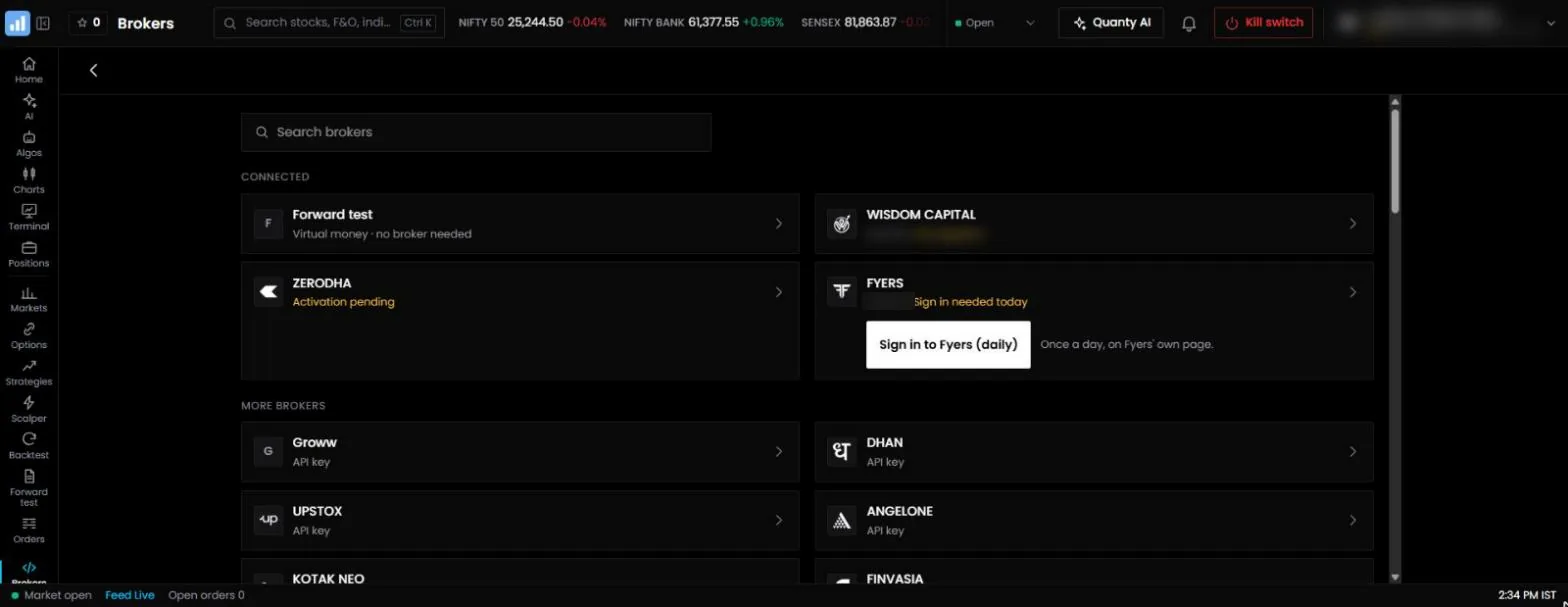
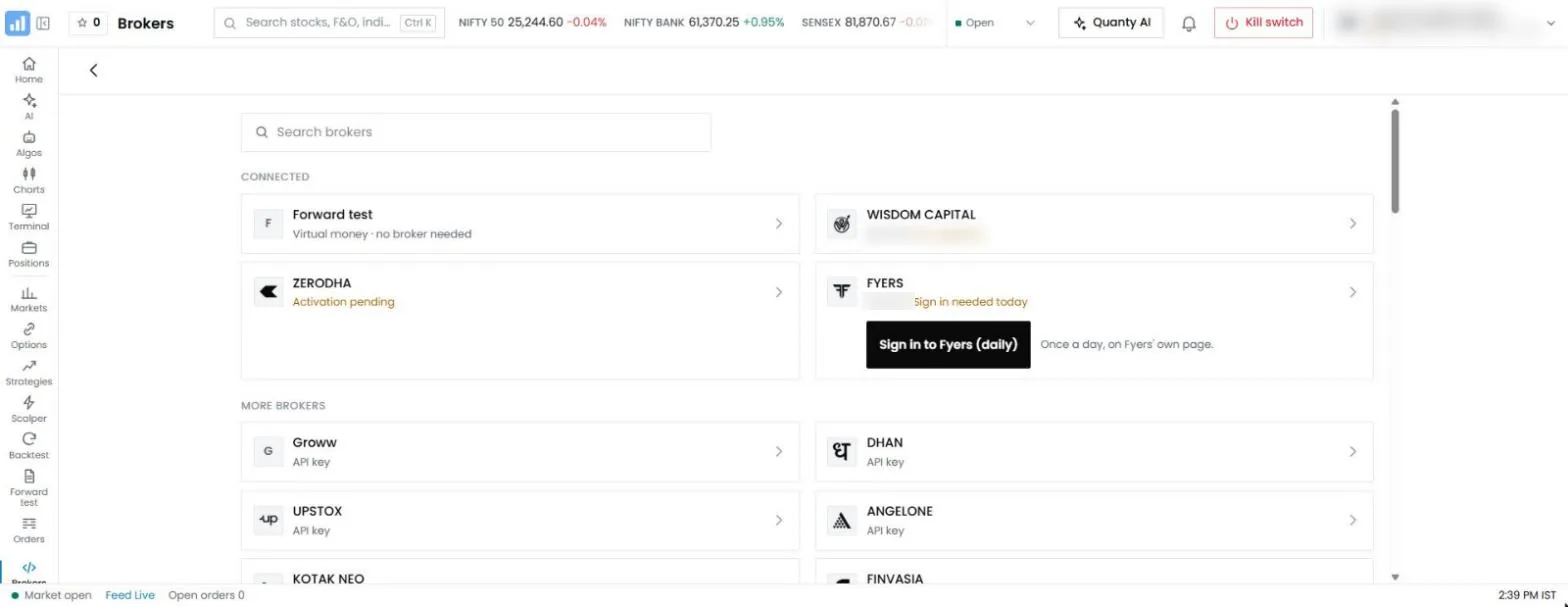
- Connect their broker. They link their own broker account through the broker's official API, with their own client code and API key. QuantPower connects 100+ Indian brokers, including Wisdom Capital, Zerodha, Upstox, Fyers and IIFL Capital; the guide to broker connection requirements explains what each connection needs.
- Register the static IPs. The broker row in QuantPower shows the two static IPs that come with the account. The client registers them on their broker's developer page, as SEBI's framework requires for API orders.
- Sign in to the broker each trading day. Brokers end a login at the end of the day. Depending on the broker, the client signs in on the broker's own page from QuantPower, presses "Log in again", pastes a new token, or types a code.
- Build and test their own rules. They build a strategy they understand, backtest it with costs and run it in Forward test on live prices.
- Set their own limits. They set a stop for each strategy, a daily loss limit and Smart Exit for the account before anything goes live.
Funds and securities stay with the broker throughout. QuantPower does not hold client money.
What your clients get in their own account
An AP is often asked "what will I actually be able to do?" Each client's own QuantPower account includes:
| Feature | What the client can do |
|---|---|
| Algos | Build option, futures and stock strategies with entries, exits, stops and targets, from templates or their own legs; once switched on, an algo runs by its rules |
| Forward test | Run the same algo on live prices with test money, with no order reaching the broker |
| Backtests | Test rule-based and option strategies on past data, with costs and slippage |
| Charts by Arth | 201 indicators, 19 chart types, 89 drawing tools and up to 16 charts on one screen, with order, position and GTT lines on the chart |
| Option chain and strategy builder | Open interest, implied volatility and Greeks; payoff graphs and margin before an order |
| Trading terminal | Positions, holdings, funds, GTT orders, baskets of up to 20 legs, iceberg orders and stock SIP |
| The Scalper | A fast option screen with the call and put charts side by side |
| Quanty | An AI assistant that answers questions and builds strategies to check, in 25 languages; it never switches an algo on |
| Connect AI | Links the client's own AI app to their account, to read it and prepare orders that only the client can confirm |
| Risk controls | A kill switch, a daily loss limit, a cap on orders a day and Smart Exit for the whole account |
The client pays for what they use in tokens. Charts, the option chain, the screener and the strategy builder are free.
Teaching sessions an AP can run
Teaching is the most useful thing most APs can offer, and it fits SEBI's rules as long as it stays general. A session that shows how to build, test and limit a strategy, using sample instruments and no recommendations, gives clients a skill rather than a tip.
Topics that work well in sessions:
- Reading the option chain. Open interest, change in open interest, implied volatility and the Greeks.
- Writing rules down. Turning "I sell a straddle in the morning" into an entry time, strike rule, stops and a time exit.
- Testing honestly. What a backtest can and cannot show, why costs matter, and how to read drawdown.
- Forward test. Running a strategy on live prices for several weeks before real money.
- Risk controls. Setting a daily loss limit and Smart Exit, and using the kill switch.
- Daily routine. Signing in to the broker before the market opens and checking each algo card.
A worked example: an AP with forty option clients
Say you are an AP with forty clients who trade index options by hand, and a dozen of them ask about automation.
Week 1. You run a session like the one above. The twelve clients each open a QuantPower account in their own name and connect their own broker account. You walk them through finding the two static IPs on the broker row and registering them with the broker. Two clients' brokers need a fresh API key; they create it themselves on the broker's developer page.
Week 2. Each client builds one strategy they already trade by hand, in their own words, and backtests it with costs. Some find that their manual rule loses after costs; that is a useful result, and they change or drop it. Nobody shares a strategy with anyone else.
Weeks 3 to 6. The strategies run in Forward test on live prices. Clients compare the Forward test with the backtest for the same weeks. You hold one follow-up session on reading the results and setting limits.
Week 7 onward. Clients who want to go live switch on their own algo on their own account, with a daily loss limit and Smart Exit set. Each signs in to their broker every trading day. You keep answering questions about the software and do not choose strikes, place orders or log in for anyone.
Throughout, each client is a separate account with its own rules, its own broker session and its own limits. If the market moves sharply, each client's own risk controls act on that client's account only.
Helping clients with the daily broker login
The daily login is the step new users most often get wrong, so it is worth explaining well. Brokers end a login at the end of the day or sooner, and QuantPower follows each broker's own rule:6
| Broker type | What the client does each day |
|---|---|
| Brokers on the XTS trading system | Press "Log in again" in QuantPower, which uses the saved key |
| Fyers, Zerodha, Upstox | Sign in on the broker's own page from QuantPower and come back; the password never touches QuantPower |
| Dhan | Paste a new access token when the old one ends |
| Shoonya | Type that day's login code |
If a client has not signed in when their algo is due to enter, the algo does not trade, and its card says why. A live algo cannot be switched on while the broker is signed out. Remind clients to sign in before the entry time, not after.
Risk controls your clients should set
APs often meet clients after a bad day, so it helps to explain the controls before the first live trade:
- A stop on every strategy. Each algo carries its own stop-loss and exit time.
- A daily loss limit. Once the day's loss reaches it, new orders are refused.
- Smart Exit. A profit target, stop-loss and trailing step for the whole account; when it is hit, it stops the algos and squares off.
- A cap on orders a day, if the client wants one.
- The kill switch. Stops trading in the chosen segments until their next session. Running algos in those segments stop.
The loss figure adds up every broker the client has connected, so a client with two brokers has one limit, not two.
What to tell a client before they start
Clients who come to automation through an AP often arrive with expectations set by advertisements elsewhere. A short, honest conversation at the start saves a lot of trouble later. These are the points worth making, in plain words:
- Software runs your rules, not ours. QuantPower does exactly what the client's rules say, on the client's account. If the rules lose money by hand, they will usually lose money automatically, only faster and more consistently.
- A backtest is a test, not a forecast. It shows how the rules would have behaved on past prices, after costs. Markets change, and the contract itself has changed several times since 2024: lot sizes, expiry days, margin and tax.
- Forward test comes first. Several weeks on live prices with test money show the real fills, the spread and the days the broker session was not signed in. Going live without it skips the cheapest lesson available.
- Costs are real. Brokerage, STT, exchange charges, stamp duty, GST and slippage apply to every order. Strategies that trade often, or that aim for small moves, pay the most.
- Limits are set before the first order. A daily loss limit, Smart Exit and a stop on every strategy decide how bad a bad day can get. The client chooses those numbers, not the AP.
- The broker login is the client's job every day. Nobody else may sign in for them, including the AP.
- Most individual F&O traders lose money. SEBI's own studies say so year after year. Automation does not change that by itself; written rules and limits only make the risk visible in advance.
A client who still wants to go ahead after hearing this is the kind of client who tends to use the software well.
A checklist before a client goes live
Run through this with each client, on their own screen, before their first live algo:
- The QuantPower account is in the client's own name, with their own mobile number and e-mail.
- The broker connection shows "signed in", with the client's own client code.
- Both static IPs are registered on the client's broker developer page.
- The strategy is the client's own, written in rules the client can explain in their own words.
- The strategy has been backtested with costs over a period that includes rising, falling and quiet markets.
- It has run in Forward test for several weeks, and the client has compared the Forward test with the backtest.
- Each strategy has a stop-loss and an exit time; the account has a daily loss limit and Smart Exit set.
- The client knows where the kill switch is and what it does.
- The client knows how to pause or stop an algo, and how to exit a position by hand.
- The client has enough tokens for the live algo for 28 days, and knows the charge is pro-rated from the day it is switched on.
If any line is not true, the strategy stays in Forward test until it is.
QuantPower for brokers
Some APs are asked by their broker whether there is a branded algo and trading terminal the broker could offer all its clients. QuantPower can also run as a broker's own client terminal, with the broker's name and logo, inside the broker's own systems. Clients then sign in with their broker client code, without an API key, and the broker decides which features are on. If your broker is interested, introduce them to us; the commercial terms are agreed between QuantPower and the broker.
Introducing clients through the partner programme
APs can introduce clients through the QuantPower partner programme, which is open to APs, SEBI-registered research analysts and investment advisers, and educators who make no return claims. Each client you introduce signs up in their own name, pays for what they use in tokens and runs QuantPower on their own account. Partner terms, including the share for each partner type, are set out in writing when an application is accepted.
Your agreement with your broker may also cover which third-party tools you promote, so check it before you start.
Common mistakes APs make
- Logging in for a client. Even to help, it breaks the rule that credentials stay with the client, and it makes the AP responsible for whatever happens next.
- Sharing one strategy across clients. Building one strategy and asking clients to copy it turns the AP into an algo provider without empanelment.
- Quoting a backtest. "This strategy made 40% last year" is a return claim, whatever its source.
- Calling the software approved. SEBI does not approve trading software; say what QuantPower is, not what it is not.
- Skipping Forward test. Clients who go live on the first day meet slippage, rejected orders and expired sessions with real money.
- Forgetting the daily login. An algo whose broker is signed out does not trade. Make the morning sign-in part of every session you teach.
Where AP and algo rules are going
The direction since 2018 has been consistent: fewer intermediaries between the client and the broker, clearer limits on who may decide trades, and more of the trading tied to the client's own identity, key and registered IP. The retail algo framework in force since 1 April 2026 continues that, by registering algos and tagging their orders.
For APs, that points away from running clients' trades and towards service: teaching, setting up, explaining risk controls and answering questions. Tools that let each client run and limit their own rules make that role easier, not smaller. SEBI may refine the framework further, so check the latest SEBI and exchange circulars before you change how you work with clients.
Pricing
QuantPower is priced in tokens (1 token = ₹1, GST extra), and each client pays for their own account; there is no plan that covers several clients. A live algo costs 200 tokens per 28 days, a Forward test 100, and a backtest 2, with the first 10 each week free. Charts, the option chain, the screener and the strategy builder are always free, and the two static IPs are included. New accounts get free sign-up tokens. See QuantPower pricing.
Start with 500 free tokens
Connect your broker, build a strategy and test it on paper before a single live order goes out.
Frequently asked questions
Can I run one strategy on all my clients' accounts?
No. QuantPower trades only the account of the person who connects it. Deciding trades for clients needs SEBI registration as a portfolio manager, and offering your own algo to clients needs empanelment as an algo provider.
Can my clients use QuantPower themselves?
Yes. Each client opens a QuantPower account, connects their own broker account, registers the two static IPs with their broker and signs in to their broker each trading day.
Can I share my own algo with my clients?
Not without empanelment as an algo provider. An algo you build may be used only by you and your immediate family.
Is a sub-broker the same as an authorised person?
In practice, yes. SEBI discontinued the sub-broker category in 2018, and sub-brokers had until 31 March 2019 to become authorised persons or brokers.
Do my clients need their own static IP?
No separate purchase is needed. Every QuantPower account comes with two static IPs at no charge, and the client registers them with their broker.
Can my broker offer QuantPower under its own name?
Yes. QuantPower can run as a broker's own client terminal, with the broker's name and logo. Introduce your broker to us and we discuss it with them directly.
Related guides
- Best broker for algo trading: broker APIs, charges and limits compared
- Broker connection requirements: what each broker connection needs
References
- SEBI, circular on the role of sub-brokers vis-à-vis authorised persons (SEBI/HO/MIRSD/DoP/CIR/P/2018/117), 3 August 2018 (sebi.gov.in)
- SEBI, circular on algorithmic trading services offered by stock brokers (SEBI/HO/MIRSD/DOP/P/CIR/2022/117), 2 September 2022
- SEBI, amendments and circular on the association of regulated entities with unregistered persons who give advice or make return claims, August 2024 (sebi.gov.in)
- SEBI, circular on safer participation of retail investors in algorithmic trading, 4 February 2025, and glide-path circular, 30 September 2025 (sebi.gov.in)
- SEBI (Portfolio Managers) Regulations, 2020
- QuantPower: broker connections, static IPs, daily sign-in rules, risk controls and prices, from the app's code and price list, checked 12 November 2026