You tap once for the whole order. QuantPower divides the quantity into legs of whole lots, sends the first leg at once, and sends each later leg only when the one before it has filled in full. Every leg is a normal order on your own broker account and passes every check an order passes: the kill switch, the daily loss limit, the cap on orders a day, the ban list, the broker login and the static IP. Nothing is ever retried on its own. If a leg is rejected or cancelled, if the kill switch goes on or if the market closes, the rest of the order stops and you are told why.
What iceberg orders in QuantPower do
| Part | What it does |
|---|---|
| Legs | 2 to 50, each a whole number of lots; any extra lots go on the first legs |
| Order types | Limit and stop-loss limit. Market orders are not allowed, so no leg fills at a runaway price |
| Sending | One leg at a time; the next leg goes only after the previous one has filled in full |
| Freeze quantity | When the exchange's freeze quantity is known, the number of legs is raised so no leg passes it |
| Automatic split | An ordinary order above the freeze quantity is split on its own into the fewest parts that fit and sent together; this is not an iceberg |
| Checks | Every leg passes every order check, like any order you place |
| Your tap | One tap for the whole order, bound to the exact order you reviewed |
| Stopping | A rejected or cancelled leg, the kill switch, a lost broker session or the market's close stops the rest |
| Changing the price | A new price on the open leg carries to every leg still to come |
| Cancelling | "Cancel remaining" stops the legs not yet sent; the leg at the exchange is cancelled only if you tick that |
| Validity | Day, or a number of minutes; legs not sent when the time runs out are never sent |
| Brokers | Every broker QuantPower places orders with, and the Forward test account |
| Price | Free: no tokens |
A short history of hiding order size
Large traders have always tried not to show their full hand. On trading floors, a broker with a big order to fill would work it a little at a time, bidding for a few hundred shares here and there rather than announcing the whole amount, because a large visible order moves the price against the person placing it. When the size could not be hidden, big blocks were arranged privately, "upstairs", away from the trading floor.
Electronic order books made the problem sharper. Every resting order is visible to every screen, so a large bid tells the whole market that a buyer is waiting. Exchanges answered with orders that show only part of their size. These became known as iceberg or reserve orders, because most of the order sits below the surface. Researchers studying European and American exchanges in the 2000s found that hidden size was common and that traders used it most for large orders in less liquid shares.12
Alongside hidden orders came execution algorithms, which split a large order over time instead of hiding it. In 2000, Robert Almgren and Neil Chriss described the basic trade-off: trade quickly and pay more in price impact, or trade slowly and take more risk that the price moves away.3 Methods such as VWAP and TWAP, which spread an order across the day in line with volume or time, grew from that work and are now standard at institutional desks.
In India, the exchanges set a maximum size for a single order in each futures and options contract, called the freeze quantity. An order above it is rejected in full. As lot sizes and contract values rose after 2024, and as more traders ran larger option positions, splitting an order to stay under the freeze quantity became an everyday need, not only an institutional one.4 QuantPower's iceberg order does both jobs: it keeps each leg under the freeze quantity, and it shows only one leg at a time.
How an iceberg order works, step by step
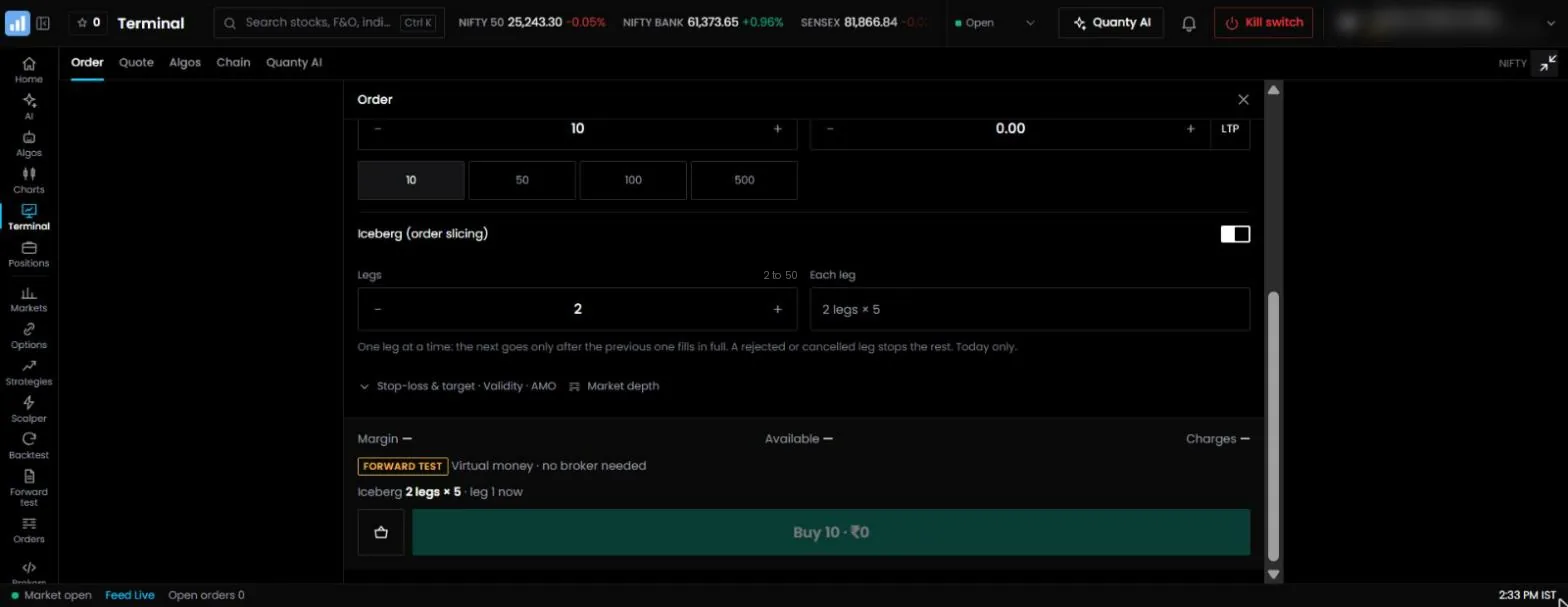
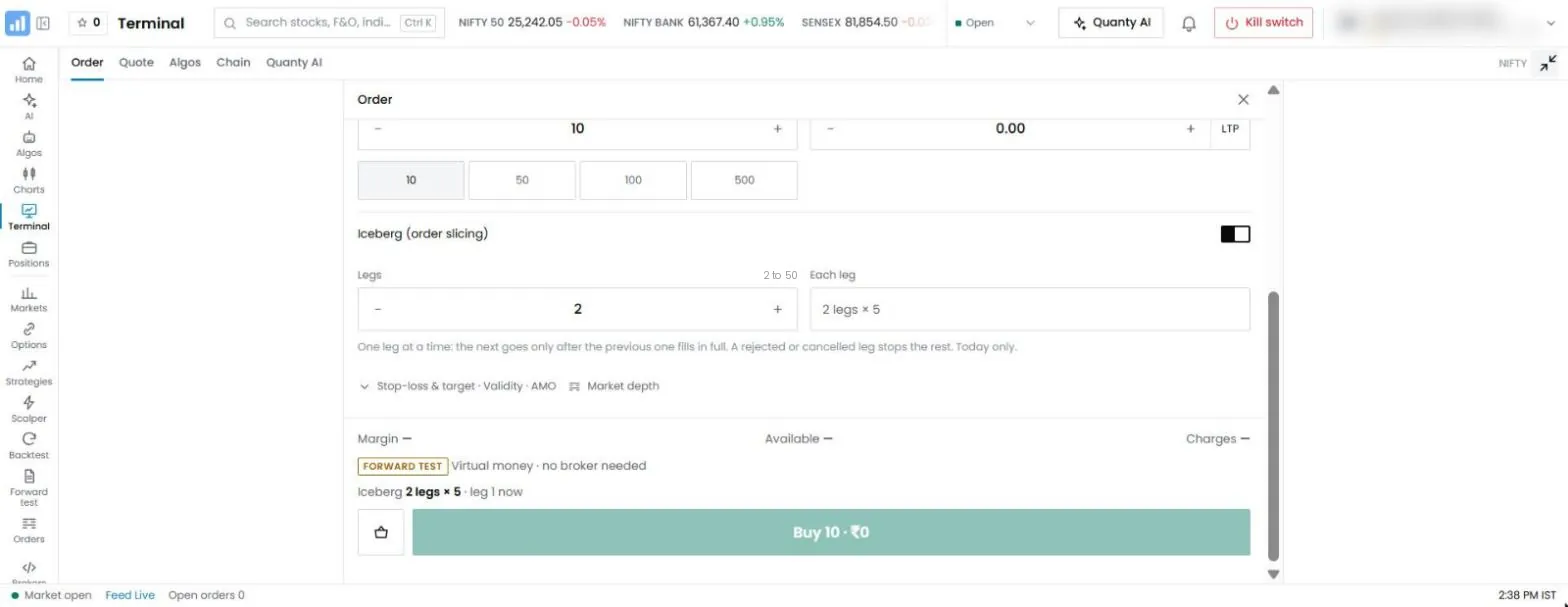
- You fill the order sheet: buy or sell, the instrument, the total quantity, the order type, the price and the product, and choose Iceberg with the number of legs.
- QuantPower splits the quantity into that many legs of whole lots. If 13 lots go in 4 legs, the legs are 4, 3, 3 and 3 lots: the extra lot goes on the first leg.
- The freeze quantity is checked. If a leg would be larger than the exchange's freeze quantity for that contract, the number of legs is raised, up to 50, until every leg fits. If even 50 legs cannot carry the quantity, the order is refused with the largest quantity that would fit.
- You tap once to confirm. The tap is tied to this exact order and works once.
- The first leg goes to your broker at once, through the same order path as any order.
- A worker watches the fills. When the leg's status at your broker shows it filled in full, the next leg is sent. A leg that has filled only in part keeps the rest waiting.
- This repeats until every leg has filled, or until something stops it.
A leg is sent at most once. QuantPower records each leg before sending it, so a restart, a duplicate fill message or a retried request can never send the same leg twice. If the server cannot confirm whether a leg reached the broker, the order stops rather than sending it again blind.
Placing an iceberg order
- Open the order sheet for the instrument, such as a Nifty call, from the option chain, the chart or the watchlist.
- Choose Buy or Sell, the order type and the product.
- Enter the total quantity in whole lots and the price for a limit order.
- Choose Iceberg, the number of legs from 2 to 50, and the validity: Day or a number of minutes.
- Check the margin shown for the full order against your available funds.
- Tap to place it.
For how an iceberg order compares with a limit, market or stop-loss order, see our guide to order types.
| Setting | Example | Notes |
|---|---|---|
| Total quantity | 2,600 | 40 lots of 65. Must be a whole number of lots |
| Legs | 4 | 650 units, or 10 lots, in each leg |
| Order type and price | Limit at 280.50 | Each leg is a limit order at this price |
| Product | Overnight | Use Intraday for a position you will close the same day |
An iceberg order needs at least two lots, so that there are at least two legs. For shares, where the lot is one share, it needs at least two shares; in practice it is used for much larger quantities.
Freeze quantity: the exchange's limit per order
Exchanges set a maximum quantity for a single order in each F&O contract, called the freeze quantity. An order above it is rejected in full, however much margin you have. When QuantPower knows the freeze quantity of the contract, it makes sure no leg passes it, raising the number of legs if needed. From 5 October 2026, NSE's freeze quantity is 3,510 units for Nifty contracts and 1,440 units for Bank Nifty.4 NSE revised these limits more than once in 2026, so check its current list before sizing a large trade.
With fifty legs as the maximum, the largest iceberg order is fifty times the largest allowed leg. If the freeze quantity of a contract is smaller than one lot, an iceberg order cannot be placed on it, and the order sheet says so.
The same limit applies when you exit. A large short option position has to be bought back in legs too, which matters on a fast day. Plan the size of a position with its exit in mind.
Automatic split of an ordinary order
You do not have to choose an iceberg for a large order to go through. If you place an ordinary order, by hand, from a basket, from an algo or from an exit, and its quantity is above the exchange's freeze quantity for that contract, QuantPower splits it on its own into the fewest orders of whole lots that fit under the limit, and sends them together, not one after another, so an exit never waits for a fill. Each is its own order and passes every check. The order sheet tells you before you confirm, for example: "Above the exchange's freeze quantity: goes as 3 orders, sent together (2 × 1800 and 1 × 900). If one is refused, the rest are not sent." Nothing is retried, and if one part is refused you are told how much was not sent.
The automatic split is about the exchange's limit, not about hiding size: all parts show in the book at once, and the order completes as fast as it can. When you want only one leg in the book at a time, choose Iceberg yourself; its legs go one at a time, up to 50.
What stops an iceberg order
QuantPower never retries a leg on its own. Each of these stops the remaining legs:
| What happens | What you see |
|---|---|
| A leg is rejected by your broker | The order stops; the reason from the broker is shown |
| A leg is cancelled, at your broker or by you | The order stops; legs not yet sent are never sent |
| A leg fills in part and the rest is cancelled | The order stops with the part filled |
| The kill switch goes on | "Kill switch is on." No further leg is sent |
| Your daily loss limit or order cap is reached | The next leg is refused, and the order stops |
| Your broker session ends or the broker is disconnected | The order stops; sign in again and place a new order for the rest |
| The validity runs out or the market closes | The order stops; legs not yet sent are never sent |
When an order stops, you get a message in the app at once, and the Orders list shows the iceberg order as stopped, with the reason, the quantity filled and the legs that were never sent. Your filled legs stay in your position.
How legs appear
| Where | What you see |
|---|---|
| The iceberg order in QuantPower | Filled quantity against the total, each leg's status, and the reason if it stopped |
| Your order book | One order per leg, each with its own order ID |
| Positions | The combined quantity at the average fill price |
| Market depth, as other traders see it | Only the open leg, added to the queue at its price |
| Your broker's contract note | Each leg as a separate order, with its own brokerage |
| Leg status | Meaning |
|---|---|
| Filled | The leg filled in full |
| Open, partly filled | Part of the leg filled; the rest waits at your price |
| Waiting | Not sent yet, because an earlier leg has not filled in full |
| Not sent | The order stopped before this leg was due |
Check the filled quantity, not the total you entered, before you place a hedge or an exit.
Cancelling an iceberg order
"Cancel remaining" stops every leg not yet sent. The leg already at the exchange is a separate question, and you answer it in the same step:
- Leave the working leg. It stays at the exchange and may still fill. Use this when you want what is already queued, but nothing more.
- Cancel the working leg too. QuantPower sends a cancel for it through the normal cancel path. Use this when you want out entirely.
Either way, legs that have filled stay in your position. Cancelling, like placing, needs your confirmation.
A worked example: buying 40 lots of a Nifty call
Suppose you want to buy 40 lots of a Nifty call, 2,600 units at a lot size of 65, with a limit of ₹280.50.
- Enter 2,600 as the quantity, a limit of 280.50 and 4 legs. Each leg is 10 lots, or 650 units.
- The full order needs about ₹7,29,300 in premium; the order sheet shows the margin before you tap.
- Leg 1 goes out at once and fills at 280.50. Leg 2 goes out and fills.
- Leg 3 goes out as the price ticks up to 281. It fills 260 units and waits at 280.50 for the rest.
- You see 1,560 of 2,600 filled. You can wait, change the open leg's price (the new price carries to the leg still to come), or cancel the remaining legs.
At no point did the order book show more than 650 units of your order. If you had placed 2,600 units as one order, other traders would have seen a large buyer waiting at 280.50 and might have raised their offers.
A worked example: exiting a large short position
Suppose you are short 60 lots of a Bank Nifty put and want to buy it back. Sixty lots at a lot size of 30 is 1,800 units, above Bank Nifty's freeze quantity of 1,440.
- Choose Buy, the put, 1,800 units, a limit price near the current offer, and 2 legs.
- QuantPower checks the freeze quantity: two legs of 30 lots, 900 units each, fit under 1,440, so 2 legs are kept.
- Leg 1 fills. Leg 2 goes out and fills a few seconds later at a slightly higher price.
On a calm day the exit takes seconds. On a fast day, the second leg may meet a higher price, or not fill at your limit at all. If the exit is urgent, set the limit with room to fill, and watch the open leg.
Iceberg orders on shares
Iceberg orders are not only for options. On a share, where one lot is one share, the quantity is split into legs of whole shares. A trader buying 5,000 shares of a mid-cap stock for delivery can send them as five legs of 1,000, so that the order book never shows a buyer for 5,000.
Shares have no freeze quantity of the F&O kind, so the number of legs is simply the one you choose. What matters more for shares is the depth of the book. A large-cap share in the Nifty 50 may show tens of thousands of shares at the best few prices; a smaller share may show a few hundred. Size each leg so it can fill against what the book is showing, and use a limit price so that a thin moment does not fill a leg far from the last trade.
The product rules are the same as for any order on shares: Intraday or Delivery, and MTF where your broker offers it. A delivery buy in legs still needs the full amount in your account, and each leg is checked against it as it goes.
Reading market depth before you slice
The market depth shows the best five buy and sell prices and the quantity waiting at each. It is the best guide to how big each leg should be.
| Offer price | Quantity waiting |
|---|---|
| 280.50 | 455 |
| 280.55 | 390 |
| 280.60 | 715 |
| 280.65 | 260 |
| 280.70 | 520 |
Suppose this is the sell side of a Nifty call, and you want to buy 2,600 units. As one order at a limit of 280.70, you would take every offer on the screen, 2,340 units, and wait for 260 more, with the full size visible to everyone. As four legs of 650 units at 280.55, the first leg takes the 455 units at 280.50 and 195 of the 390 at 280.55, and the book has time to refill before the next leg arrives.
Depth changes from second to second, and the five prices are not the whole book. Use it to judge the scale of each leg, not as a promise of where it will fill.
The checks every leg passes
Because each leg goes through the same order path as any order, the checks you rely on for single orders also protect an iceberg order, leg by leg:
- The order itself: the instrument, the product, the lot size and the tick size.
- Your account's settings: the segment is on, and iceberg orders are on for your account.
- Risk: the kill switch, the daily loss limit, the cap on orders a day and the exchange's ban list.
- Your broker: the broker is connected and signed in for the day, and the order leaves from your static IP.
If any check refuses a leg, the iceberg order stops there. That is deliberate. A kill switch you pressed halfway through a large order should stop the rest of it, and it does.
When iceberg orders help
| Situation | Use an iceberg order? | Why |
|---|---|---|
| Quantity above the freeze limit | Yes | A single order would be rejected |
| Large order in a liquid contract | Often | The order book refills between legs, so each leg meets fresh orders |
| Large order in a thin strike | With care | Even small legs can move the price; use a limit and expect partial fills |
| Small order | No | One order fills at once and pays brokerage once |
| Urgent exit in a fast market | Only if the size needs it | Later legs can fill much worse, or not at all at a limit price |
Costs and risks of slicing
- Brokerage per leg. At a broker charging ₹20 per executed order, four filled legs cost ₹80 in brokerage instead of ₹20. STT, exchange charges and stamp duty are based on value, so they do not change.
- Partial fills. A leg can fill in part and wait at your price while the market moves away. Change the price of the open leg, which carries to every later leg, or cancel the remaining legs.
- Price drift. Later legs may fill at worse prices, so the average can end up worse than the first fill. The slippage calculator estimates the cost of filling a large order.
- Margin on each leg. Your broker checks margin as each leg arrives, so a later leg can be rejected if margin runs short, which stops the rest.
- Hedged positions. For a spread or a condor, buy the hedge legs first and sell the short legs after, so your broker sees a hedged position and blocks less margin. QuantPower's baskets and algos do this ordering for you; with iceberg orders placed by hand, place the hedge first.
How to use iceberg orders well
- Use them for size, not by habit. If one order fits under the freeze quantity and the book is deep enough, one order is cheaper.
- Set the limit with care. Every leg is a limit or stop-loss limit order, which protects it from a sudden jump in price.
- Choose the number of legs from the book. Look at the market depth: if the best five prices together show about 1,000 units, legs of a few hundred units fill without reaching far into the book.
- Watch the first legs. If the first two fill quickly at your price, the rest usually follow. If the first leg waits, the price may already be moving away.
- Plan the exit when you plan the entry. A position that took six legs to build takes six legs to close.
- Check the filled quantity before you hedge. A hedge sized for the total you entered, when only half has filled, leaves you over-hedged.
Common mistakes
- Slicing small orders. Splitting two lots into two legs doubles the brokerage and hides nothing.
- Too many legs in a fast market. Fifty legs take fifty fills. If the price is moving quickly, the last legs can fill well away from the first.
- A limit with no room. A limit exactly at the best offer fills the first leg and leaves later legs waiting as soon as the price ticks up. Leave a little room, or accept partial fills.
- Forgetting the exit. A position built in legs must be closed in legs. Check that the exit fits under the freeze quantity in the number of legs you are willing to wait for.
- Hedging the total, not the fill. Size a hedge on what has filled, not on what you entered.
- Leaving a stopped order unnoticed. When an iceberg order stops, the remaining legs are not sent. Read the reason and decide whether to place a new order for the rest.
Common problems
| Problem | What to do |
|---|---|
| Refused: quantity not a multiple of the lot size | Enter the total in whole lots |
| Refused: too big for 50 legs | Reduce the quantity to the largest amount shown, or place the rest as a second order |
| Legs stopped filling | The price moved past your limit. Change the open leg's price, which carries to the later legs, or cancel the remaining legs |
| Stopped: a leg was rejected for margin | Add funds or reduce the quantity, then place a new order for the rest |
| Stopped: the validity ran out or the market closed | Place a new order for the rest |
Iceberg orders compared with other ways to split an order
| Method | How it works | Trade-off |
|---|---|---|
| One order at full size | A single order for the whole quantity | Rejected above the freeze limit; the full size shows in the book |
| Several orders by hand | You type each order yourself | Slow, and easy to get wrong in a fast market |
| Slicing at a broker | Some brokers split an order above the freeze limit into several orders | The legs may go out together, so the full size can show at once |
| Automatic split in QuantPower | An ordinary order above the freeze quantity goes in the fewest parts that fit, sent together | No setting needed; completes as fast as the limit allows, but every part shows in the book |
| Iceberg order in QuantPower | Legs go out one after another, each after the previous fills | Slower to complete, but only one leg shows at a time |
Orders, your broker and the rules
QuantPower is trading software, not a broker. Every leg is an order on your own broker account, sent through the broker's official API from the static IP registered with your broker, after your broker's daily sign-in. Your funds and positions stay with your broker throughout. Because legs go out one at a time, and only after the previous one has filled, an iceberg order never sends a burst of orders.
Where order slicing is going
Order slicing began as an institutional tool and has become an everyday one, because larger contract sizes and freeze limits push ordinary option positions past what one order can carry. The next steps in execution are already common at institutions: slicing by time or by volume, and choosing the size of each slice from the depth of the order book. Whatever the method, the trade-off Almgren and Chriss described stays the same: speed costs price, and patience costs risk.
Pricing
Iceberg orders are free in QuantPower, with no token charge. Your broker's brokerage and the statutory charges apply to each filled leg as to any order. Tokens (1 token = ₹1, GST extra) pay for live algos, Forward tests, backtests beyond the free ones and AI use. See pricing.
Start with 500 free tokens
Connect your broker, build a strategy and test it on paper before a single live order goes out.
Frequently asked questions
How many legs can an iceberg order have in QuantPower?
2 to 50. If the exchange's freeze quantity means your quantity needs more legs than you chose, QuantPower raises the number of legs, up to 50.
When does QuantPower send the next leg?
Only after the previous leg has filled in full at your broker. A leg that has filled in part keeps the next one waiting.
What happens if one leg is rejected?
The iceberg order stops. Legs not yet sent are never sent, and the Orders list shows the reason. QuantPower does not retry on its own.
Does cancelling an iceberg order cancel the leg at the exchange?
Only if you choose that. "Cancel remaining" stops the legs not yet sent; you can also ask it to cancel the working leg in the same step.
Does an iceberg order carry over to the next day?
No. An iceberg order lasts for the day, or for the number of minutes you set, and stops at the market's close.
Can I use an iceberg order in a Forward test?
Yes. Iceberg orders work on the Forward test account the same way, with test money.
Related guides
- Order book dynamics: how the queue at each price fills
- Order rejections help: why an order is rejected and what to change
- Market depth meaning: what the bid and ask quantities show
References
- Hendrik Bessembinder, Marios Panayides and Kumar Venkataraman, "Hidden Liquidity: An Analysis of Order Exposure Strategies in Electronic Stock Markets", *Journal of Financial Economics* (2009)
- Stefan Frey and Patrik Sandås, "The Impact of Iceberg Orders in Limit Order Books", *Quarterly Journal of Finance* (2017)
- Robert Almgren and Neil Chriss, "Optimal Execution of Portfolio Transactions", *Journal of Risk* (2000)
- NSE circular 136/2026 (NSE/FAOP/76693), revision of quantity freeze limits for index derivatives, 1 October 2026, effective 5 October 2026 (nsearchives.nseindia.com)
- NSE: equity derivatives contract specifications, lot sizes and freeze quantities (nseindia.com)
- QuantPower: iceberg order rules, from the app's code, checked 12 November 2026